SweepQueue does one job: it helps you find sweepstakes worth entering and makes sure you never forget to enter again. This guide walks through every part of the site, in the order you'll use it. The one-minute video below shows the whole thing.
1. Make a free account
You can browse without an account, but tracking and reminders need one. Sign up with your email or Google. We ask for your birth year and state. Every listing shows its age and state rules, and on Plus and Pro we use yours to hide sweepstakes you can't enter. Confirm your email from the link we send, and you're set.
New accounts get 7 days of Pro free, with no card needed. After that you stay on the free plan unless you choose to upgrade.
2. Browse and filter
Browse shows every sweepstakes that's open right now. We find them, read the official rules, and pull out what matters, so every card shows the same facts: the sponsor, total prize value, number of winners, how often you can enter, and when it ends.
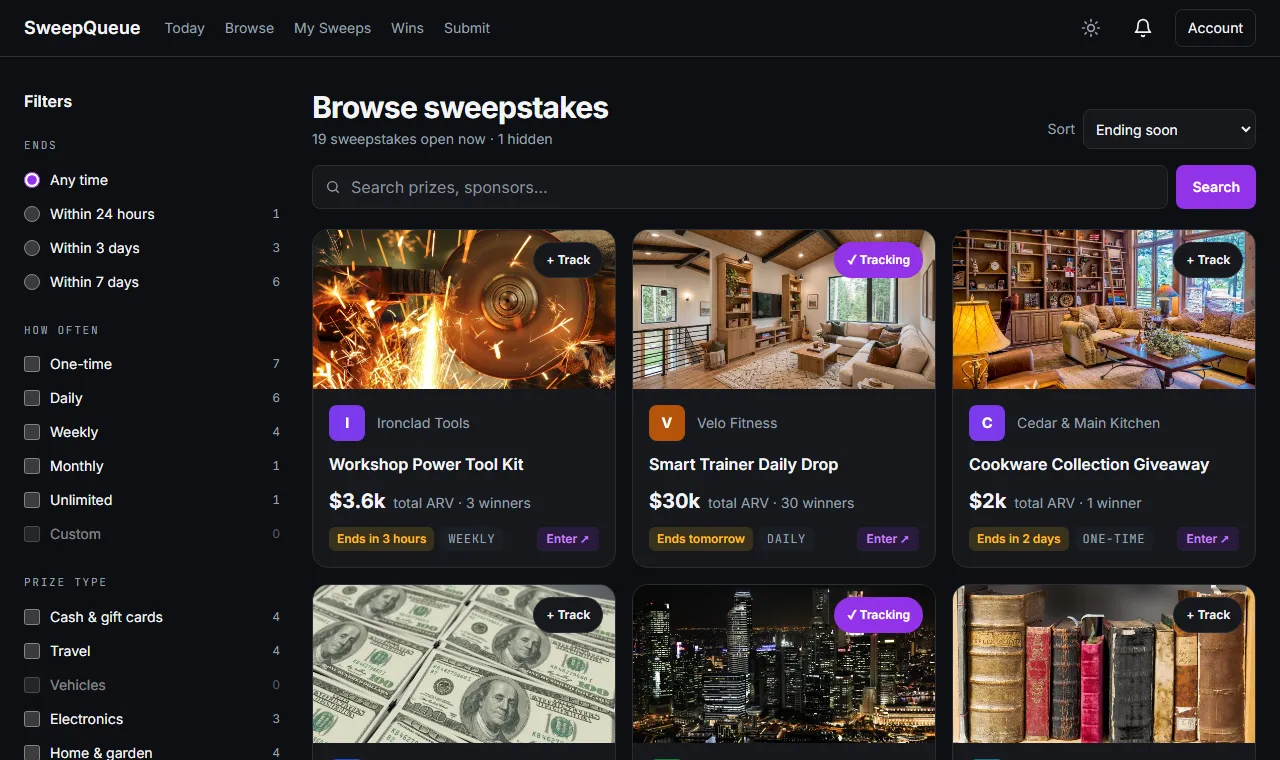
Use the filters on the left (or the Filters button on your phone) to narrow things down:
- Ends — within 24 hours, 3 days, or a week. Good for last-chance entries.
- How often — one-time, daily, weekly, monthly. Pick daily if you want a routine.
- Prize type — cash and gift cards, travel, vehicles, electronics, and more.
- Sort — ending soon, newest, highest value, most winners, or best value per entry.
Search finds prizes and sponsors by name. You can also start from a ready-made list, like daily entry, ending today, or lots of winners.
Not interested in a sponsor or a kind of prize? Hide it, and it stays out of your results. You can undo that any time under My Sweeps → Hidden.
3. Read a listing
Open any sweepstakes to see its full page. At the top: the prize value, winners, how often you can enter, and exactly when it ends, in the sponsor's time zone. Below that:
- How to enter — when your next entry opens (for example, "resets at midnight Eastern"), the ways to enter, and a link to the official rules.
- Prizes — each prize, its value, and when winners are drawn.
- Who can enter — age, which states, and whether a purchase is needed.
- Good to know — notes worked out for this sweepstakes: how many daily entries are left, taxes on big prizes, what trip and car prizes really involve.
- Comments — tips from other members who've entered.
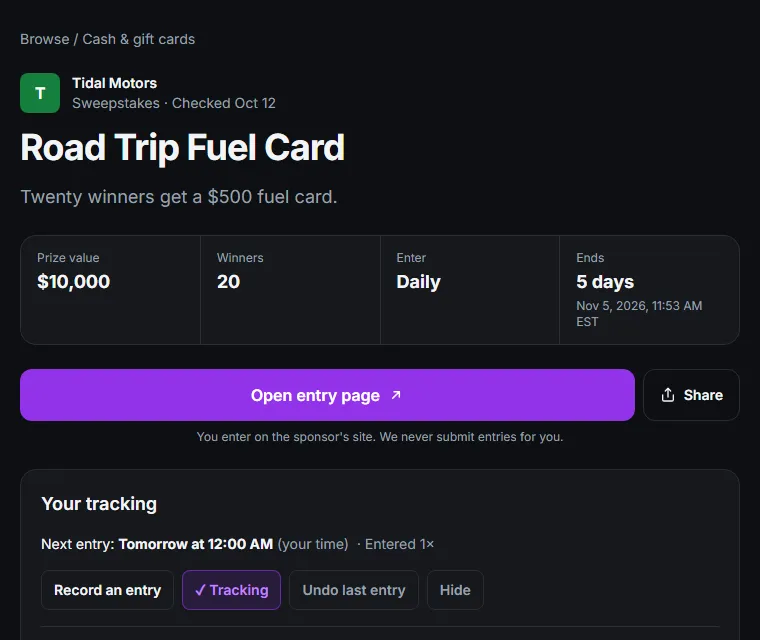
When you're ready, tap Open entry page. You enter on the sponsor's own site. SweepQueue never submits entries for you, and we never see what you type into their form.
4. Track it
Tap + Track on any card or listing. Tracking does two things: it adds the sweepstakes to your daily queue, and we remind you whenever you're allowed to enter again.
After you enter on the sponsor's site, come back and tap I entered — mark it. That's how SweepQueue knows when your next entry opens. Daily sweepstakes come back the next day (at the sponsor's reset time, not 24 hours later), weekly ones the next week, and one-time ones move to your history.
Under Notes & collections on a listing, you can keep a note to yourself (like which email you used) and, on Plus and Pro, group sweepstakes into collections.
5. Work through Today's Queue
Once you're signed in, Today is your home page. It lists every tracked sweepstakes you can enter right now, sorted so the most urgent ones come first: ending soon, then highest value, then quickest to enter. A progress bar shows how many you've done today.
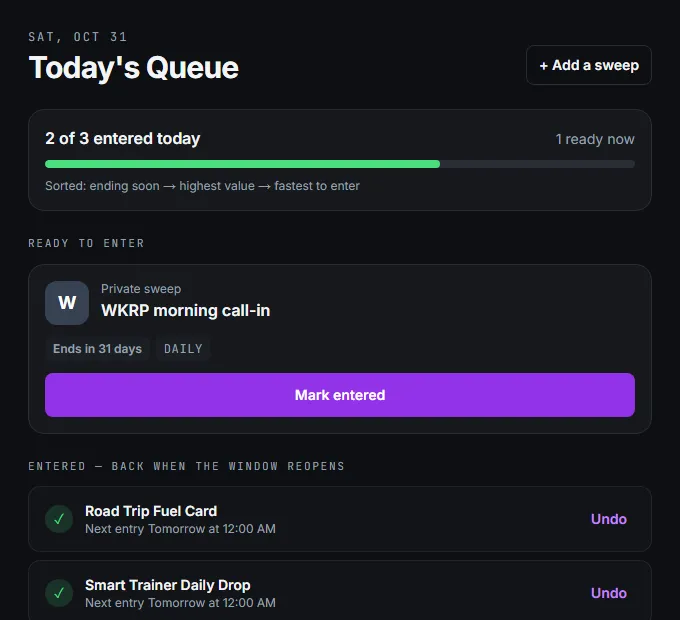
Work top to bottom: open the entry page, enter, then tap Mark entered. Finished ones drop to the bottom with the time they reopen. Marked one by mistake? Tap Undo.
When several are ready, tap Enter all. It opens each entry page in turn, and one click marks it entered and opens the next. Your daily run becomes a few minutes of clicking.
6. My Sweeps
My Sweeps is everything you're keeping track of, in tabs:
- Tracking — all your active sweepstakes and when each one opens next.
- Ended — tracked sweepstakes that have closed, with how many times you entered.
- Private — sweepstakes you added yourself (a radio call-in, a store contest). Only you see them.
- Collections — your own groups, like "Trips" or "Big ones."
- Hidden — sponsors, prize types, and listings you've hidden. Undo any of them here.
- History — every entry you've marked, by date.
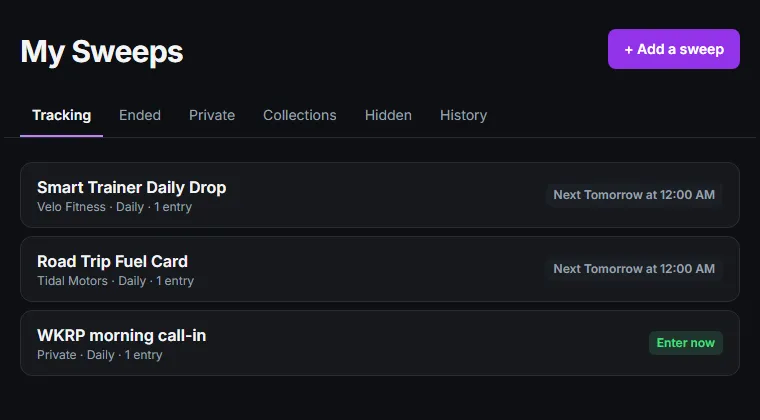
Found something we don't list? + Add a sweep lets you add it privately, or you can submit it so everyone can see it. We read the sponsor's page, check it isn't a duplicate, and a person approves it before it goes live.
7. Reminders
Under Account → Notification settings, choose what we remind you about:
- Morning queue — one reminder each morning with everything ready, instead of one per sweepstakes.
- Entry reopened — when a weekly or monthly one is ready again.
- Ending soon — a last chance in the final 24 hours, if you can still enter.
- Missed entry — when an entry window closed before you entered.
- Did you win? — after the drawing date of one you entered, so you remember to check your email.
You can set the time of your morning reminder and turn on quiet hours so nothing arrives overnight. Reminders come as notifications in your browser or the app, with email as a backup.
Saved searches work the same way for new sweepstakes. Filter Browse the way you like (say, travel prizes, daily entry), tap Save search & get alerts, and we'll tell you when new ones match.
8. Log your wins
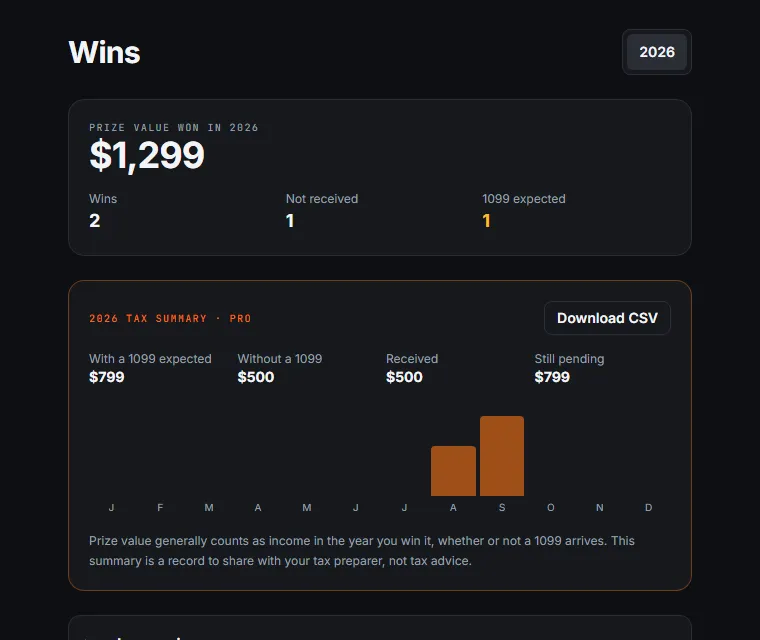
When you win, add it on Wins: the prize, its value, and whether it's arrived. You get a yearly total, a month-by-month view, and a note of which prizes will come with a 1099 tax form. That's useful at tax time; see sweepstakes and taxes.
9. On your phone
Everything here also works in the SweepQueue Android app (iPhone is coming), with the same account. The app adds push reminders and a built-in browser: open a sweepstakes, enter, and mark it without switching apps. If you find a sweepstakes we don't list while you're browsing, you can capture it from there too.
10. Free and paid plans
The free plan covers the basics: browse and search everything, track up to 10 sweepstakes, add 10 private ones, keep 5 hide rules, log 3 wins, and get 1 saved search with a weekly email. Free accounts see a few small ads.
- Plus ($5/month or $50/year) — unlimited tracking and a full queue, advanced filters (only what you're eligible for, effort, value, winners), missed-entry and "did you win?" alerts, collections, unlimited private sweepstakes and wins, and no ads.
- Pro ($10/month or $100/year) — everything in Plus, unlimited saved searches with instant alerts, calendar sync (Google, Apple, Outlook), and a yearly tax summary with CSV export of your wins.
Compare them on the pricing page. You can change or cancel any time from Account → Plan & billing.
A simple routine to start
- Add your state and birth year, and check each listing's Who can enter before you track it.
- Filter Browse to daily and track five to ten that you'd actually like to win.
- Turn on the morning queue reminder.
- Each morning, open Today and work through the list. It takes about ten minutes.
- Check your sweepstakes email (and spam) every day or two for winner notices.
More on building the habit in the 10-minute daily routine. Questions or ideas? Tell us. We read everything.